Build a scene
DISCOS shapes
Build the geometry of an object from its shape and dimensions in ESA's DISCOS database.
DISCOS is ESA’s database of objects in space. For many objects it gives a shape label and dimensions. LightCurve turns them into a 3D model.
The 20 shapes
Section titled “The 20 shapes”These are the 20 most frequent shape labels of a 73,392-object DISCOS extract (38,266 objects have a shape; 405 distinct labels). Number of objects in brackets.
| Shape | Objects | Shape | Objects |
|---|---|---|---|
| Box + 2 Pan | 9,612 | Cyl + Cone | 322 |
| Cyl | 8,805 | Irr | 315 |
| Box + 1 Pan | 5,407 | Box + 2 Ant | 216 |
| Box | 2,716 | Sphere + Cone | 199 |
| Sphere | 1,587 | Hex Poly + 2 Pan | 196 |
| Cone | 1,154 | Trunc Cone | 184 |
| Cyl + 1 Nozzle | 799 | Cyl + Sphere + 2 Pan | 182 |
| Cyl + 2 Pan | 781 | Sphere + Cyl + 1 DCone | 173 |
| Trap Box + 2 Pan | 759 | Cyl + 1 Ant | 169 |
| Sphere + Cyl | 758 | Cyl + 6 Pan | 166 |
Enter the dimensions
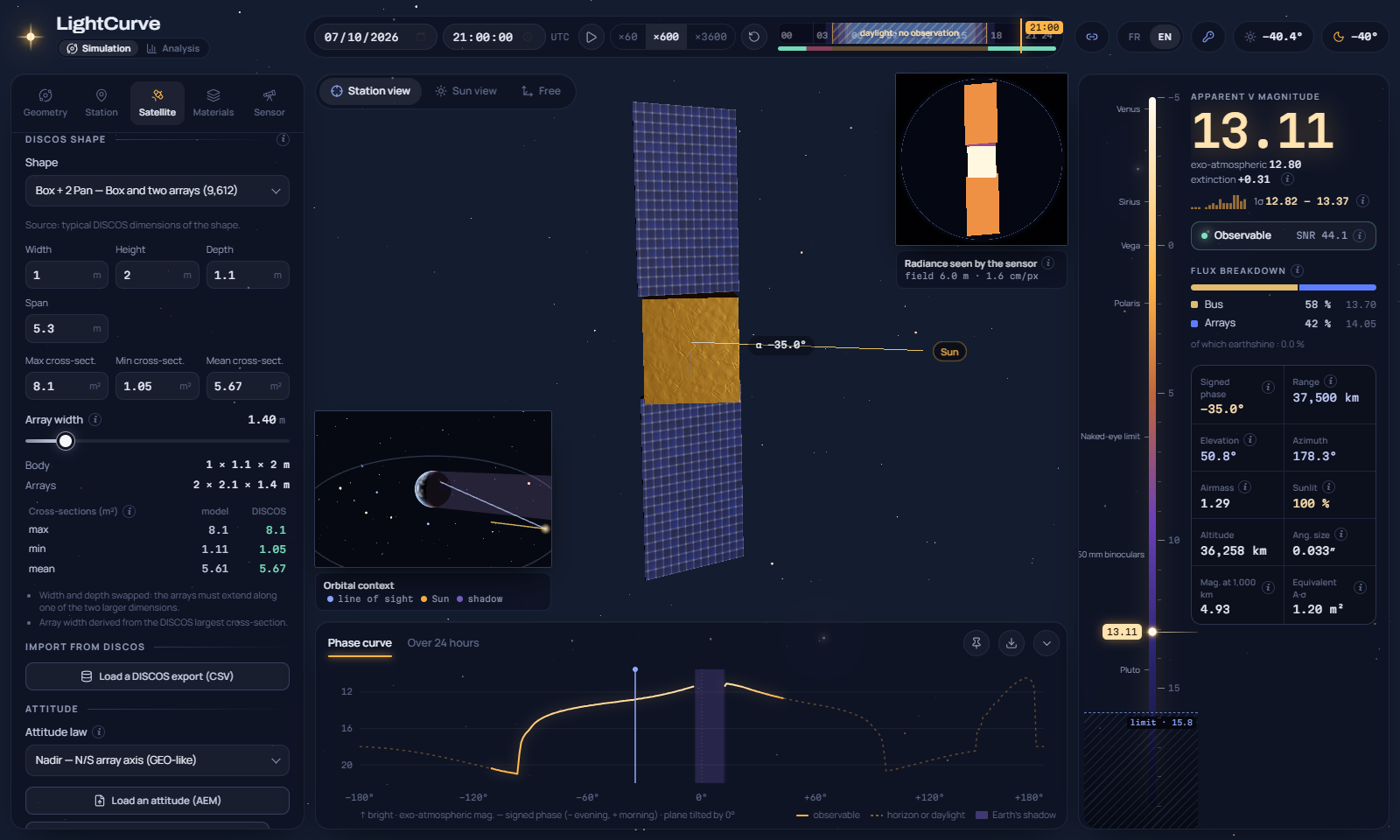
Section titled “Enter the dimensions”In the Model section of the Satellite tab. The shape starts with typical DISCOS dimensions: the median of the objects with that shape (for the box shapes, leaving out the flat buses of mega-constellations such as Starlink and OneWeb, so that the default is a representative box).
The fields change with the shape: width, height and depth for box-like bodies; diameter and height for bodies of revolution; span when the object has appendages.
Maximum, minimum and mean cross-sections (m²). The maximum is used to derive the width of the solar arrays.
The panel shows the resolved body and arrays, the model’s cross-sections next to the DISCOS ones, and the assumptions made.
What is derived
Section titled “What is derived”DISCOS does not describe the appendages in detail. LightCurve fills the gaps and lists each assumption under the shape:
| Quantity | Rule |
|---|---|
| Array length | (span − body extent along the array axis) / arrays per side |
| Array width | (largest cross-section − largest body face) / (array count × length); the body height when the cross-section is unknown; adjustable |
| Missing box dimension | The largest known one |
| Composite bodies | The share of the cone or second part (default 0.3) and the taper of cones and trapezoids are adjustable |
| Irregular | A random convex polyhedron inside the width × height × depth box, the same for the same object |
Frame: box width along Y, depth along X, height along Z (toward the Earth); bodies of revolution along X; arrays along ±Y and Sun-tracking. If the width is the smallest box dimension, width and depth are swapped, so that the arrays extend along one of the two larger dimensions.
Check against DISCOS
Section titled “Check against DISCOS”The panel compares the model’s cross-sections with the DISCOS ones, using the DISCOS definitions:
| Body | Largest cross-section | Smallest cross-section |
|---|---|---|
| With arrays | Face-on view: largest body face (or side of the body of revolution) plus all the arrays, lying in the plane of that face | Edge-on view: smallest body face, arrays seen by their edge |
| Without arrays | True maximum, seen obliquely: √(A₁² + A₂² + A₃²) for a box |
Smallest face |
The arrays are modelled nearly without thickness, as DISCOS counts them. On about 2,000 objects of the extract, the model is within 5 % of DISCOS for:
| Shape | Largest | Smallest |
|---|---|---|
| Box + 2 Pan | 91 % | 92 % |
| Cyl + 2 Pan | 97 % | 78 % |
| Box + 1 Pan | 100 % | 28 % |
| Trap Box + 2 Pan | 99 % | 1 % |
| Hex Poly + 2 Pan | 65 % | 65 % |
Remaining differences: some DISCOS entries are inconsistent (largest cross-section smaller than a body face), and for “Box + 1 Pan” and “Trap Box + 2 Pan” DISCOS adds a term to the smallest cross-section that the dimensions do not explain. The mean cross-section follows a DISCOS convention that is not documented; the model’s mean is over all directions.
Import from a DISCOS export
Section titled “Import from a DISCOS export”Load a CSV export of DISCOS metadata (columns shape, width, height, depth, diameter, span, xSectMax, xSectMin, xSectAvg, plus identifiers), then search an object by NORAD number, COSPAR id or name. A click fills the shape and the dimensions. Shapes outside the 20 are mapped to the closest one and marked. See DISCOS export.
The export stays in memory for the session: it is not stored in the browser nor in the shared link.